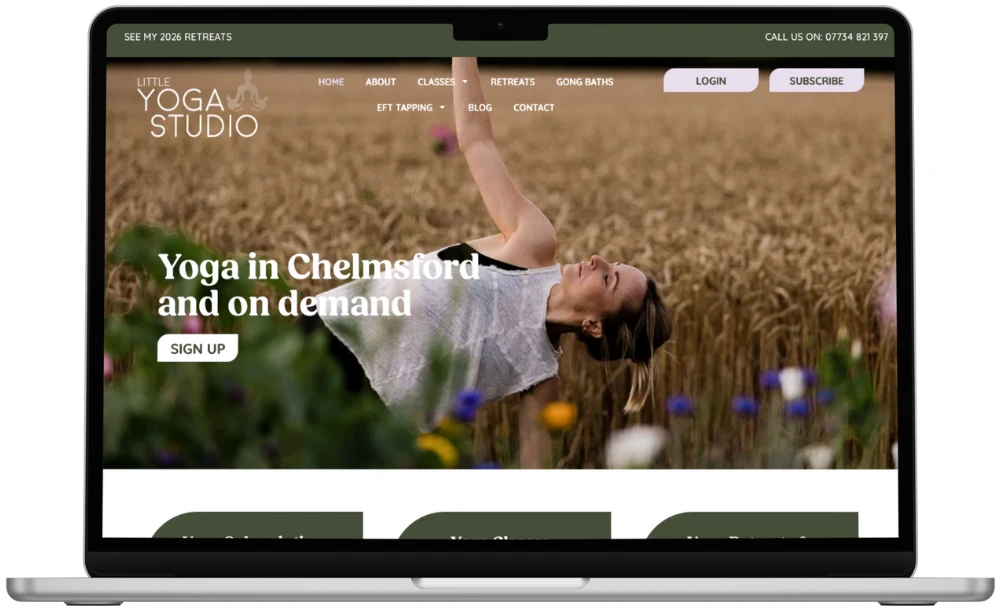
Little Yoga Studio needed a website that reflected the warmth and accessibility of its classes while supporting future growth through online bookings, subscriptions and digital content. The project focused on creating a flexible, easy-to-manage website that would support class bookings, video content and e-commerce, while improving the overall user experience and visibility in search.
WHAT WE DID FOR LITTLE YOGA STUDIO:
We worked closely with Little Yoga Studio from the outset, starting with clear conversations around goals, functionality and how the site needed to support day-to-day operations. Taking a staged approach, we designed website mockups to map the user journey before moving into the full rebuild. The site was rebuilt using WordPress with a page builder, allowing the client to manage updates independently. Along the way, we integrated WooCommerce, subscriptions and an account area for video content, while simplifying the booking journey for users. Regular check-ins and clear documentation ensured transparency throughout, with result tracking and guidance provided to support confidence after launch.
IN CONCLUSION
The result is a welcoming, functional website that supports both in-person and online yoga offerings, with the flexibility to grow as the business evolves. Thoughtful website design has given Little Yoga Studio a strong digital foundation, making it easier for customers to book, engage and return.
A yoga studio sells a feeling as much as a timetable. People want to know a space will be friendly before they walk in or press play. The website had to carry that warmth for every visitor, including complete beginners.
It also had to do real work. Bookings, subscriptions and video content all needed to sit together without the site feeling complicated. And the team needed to manage it themselves, without calling a developer every time a class changed.
Our approach
We began by understanding how the studio runs day to day, then shaped the site around that. Mockups came first, so we could test the route from landing on the site to booking a class before any build started. Changes are far easier and cheaper at that stage.
Map the journey first, so every page has a clear job.
Use WordPress with a page builder, so the team can edit content with confidence.
Keep booking short, with as few steps and decisions as possible.
Add WooCommerce, subscriptions and a members' account area as part of one joined-up system.
Share clear documentation, so nobody is left guessing after launch.
What changed
The studio now has one place where people can discover classes, book, subscribe and return to video content. The tone feels friendly and approachable, which matches the classes themselves.
Behind the scenes, the team can update pages without waiting for outside help. Result tracking is in place, so they can see what visitors do and make decisions from real behaviour rather than guesswork. Just as importantly, the site is ready to grow if the studio adds more classes, content or products.
What other organisations can learn
You do not need to build everything at once. But you do need a structure that can take new features later without a rebuild.
Start with the visitor's goal, not the feature list. Ask what someone wants to do in their first minute on the site.
Test the layout as a mockup. It is the cheapest way to spot confusing journeys.
Choose a system your own team can run. A site that only a developer can edit soon goes out of date.
Treat bookings and payments as part of the experience. Clunky forms undo good design.
Plan for GDPR from the start. Accounts, bookings and payments all involve personal data.
Frequently asked questions
Why design mockups before building the website?
Mockups let you see and react to the layout and user journey early. It is much quicker to adjust a design than to rework a finished build. They also help everyone agree on priorities before development begins.
Can a small business manage its own WordPress site?
Yes, if it is built with that in mind. A page builder and clear documentation let non-technical teams update content, add classes and change images. We also provide guidance so you feel confident after launch.
Do online bookings and subscriptions need separate systems?
Not always. With WooCommerce, subscriptions and an account area, many of these tasks can sit within one WordPress site. The right setup depends on how you take bookings and what you want to offer, so we talk that through at the start.
How do we know whether the new website is working?
Agree what success looks like before launch, such as more bookings, subscription sign-ups or enquiries. We set up tracking so you can see how people use the site and where they drop off. That makes it easier to improve things over time.